

Understanding Phone Wallpaper Resolution: Why It Matters
The visual appeal of your smartphone's home and lock screens largely depends on the quality and fit of your chosen wallpaper. A wallpaper that doesn't match your phone's native resolution can appear pixelated, stretched, or cropped, detracting significantly from the user experience. Understanding phone wallpaper size and resolution is crucial for achieving a crisp, clear, and aesthetically pleasing display. Every pixel on your screen is designed to display a specific color, and when an image doesn't align with this pixel grid, the phone's software has to interpolate, often leading to a less-than-ideal visual outcome.
The term "resolution" refers to the number of pixels on a display, typically expressed as width x height (e.g., 1080x2400). For wallpapers, this means the image should ideally have the same pixel dimensions as your phone's screen. If your phone has a resolution of 1080x2400, then a wallpaper with those exact dimensions will provide the sharpest image. Using a wallpaper that is too small will result in pixelation when stretched to fit, while one that is too large might be automatically cropped by your phone, potentially cutting out important parts of the image.
Beyond mere aesthetics, using the correct phone wallpaper size can also subtly impact performance. While modern smartphones are powerful enough to handle scaling images, providing an image that perfectly matches the display resolution reduces the processing overhead. This can contribute to smoother transitions and a more responsive user interface, especially on devices with less powerful chipsets. Therefore, optimizing your wallpaper for your specific device is a small but impactful step in enhancing your overall smartphone experience.
Finding the Right Wallpaper Size for Your Specific Phone Model
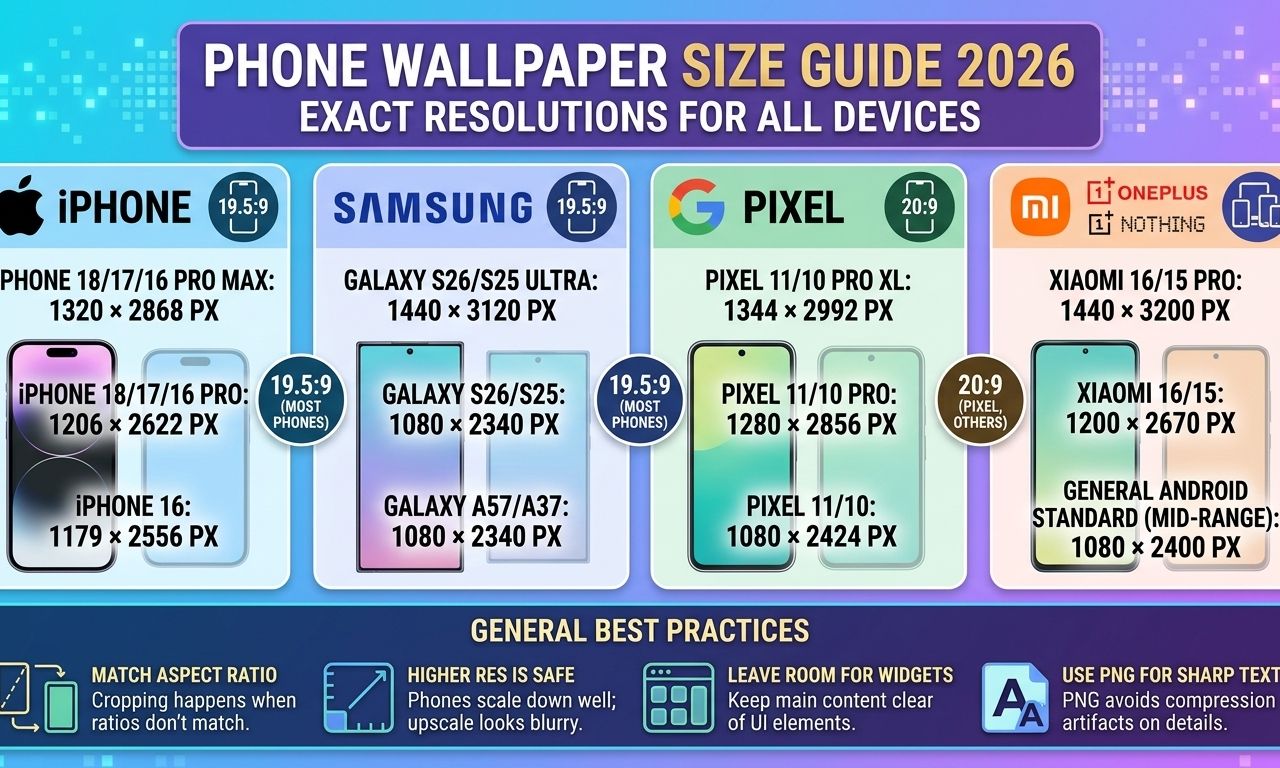
Identifying the exact wallpaper size for your phone is the first step towards perfect screen customization. While many phones share common resolutions, there's no universal "best wallpaper resolution for phone" that fits all devices. The ideal wallpaper size for iPhone models will differ from the wallpaper size for Samsung, Pixel, or Xiaomi devices due to varying screen aspect ratios and pixel densities. For instance, a common resolution like 1080x2400 wallpaper is prevalent across many Android devices, but others might use 1080x2340 wallpaper or even 720x1600 wallpaper, especially in more budget-friendly segments.
The most reliable way to determine your phone's native display resolution is to check its specifications. This information is usually available in your phone's settings under "About phone" or "Display," or through a quick online search using your exact phone model. Once you have these dimensions, you can seek out wallpapers that match. Many wallpaper apps and websites allow you to filter by resolution, making it easier to find images that will fit perfectly without needing manual adjustments.
Answers to the most common questions related to this article.
The best wallpaper resolution for your phone is its native display resolution. For example, if your phone's screen is 1080x2400 pixels, then a 1080x2400 wallpaper will provide the sharpest image.
You can find your phone's wallpaper size (its native display resolution) in your phone's settings under 'About phone' or 'Display'. Alternatively, search online for your specific phone model's specifications.
No, a 1080x2400 wallpaper will not fit all phones perfectly. While it's a common resolution, many phones have different screen dimensions, such as 1080x2340 or 720x1600. Always match the wallpaper to your phone's native resolution for the best fit.
For users with less common screen resolutions, or those who prefer unique imagery, understanding your phone's exact dimensions is even more critical. While some phones might automatically scale images, this process can sometimes degrade quality. Knowing the precise wallpaper size by phone model ensures that any custom or downloaded image will look exactly as intended, providing a seamless and high-quality visual experience every time you unlock your device.
Tips for Optimizing and Creating Custom Wallpapers
Once you know your phone's native resolution, optimizing and creating custom wallpapers becomes straightforward. If you're downloading wallpapers, always prioritize sources that offer images in various resolutions, allowing you to select the one that precisely matches your device. Many popular wallpaper applications and websites categorize images by resolution or offer an automatic detection feature to suggest the optimal size for your phone. Avoid simply downloading the highest resolution available if it significantly exceeds your phone's display, as this can sometimes lead to unnecessary file size and potential cropping issues.
For those who enjoy personalizing their device with unique images, creating custom wallpapers is an excellent option. Photo editing software, both on desktop and mobile, allows you to resize and crop images to your phone's exact specifications. When cropping, ensure that the aspect ratio of your image matches that of your phone's screen to prevent distortion. For example, if your phone has a 20:9 aspect ratio (common for 1080x2400 wallpaper), crop your image to maintain that proportion. This attention to detail ensures that your personalized wallpaper looks professional and perfectly fitted.
Consider the content of your wallpaper as well. If your phone uses a punch-hole or notch design for its front camera, you can strategically place elements of your wallpaper to complement or even hide these features. Many artists create wallpapers specifically designed around these display cutouts, turning a potential distraction into an integrated design element. Experiment with different images and resolutions, and don't be afraid to use online tools or apps that can help you preview how a wallpaper will look on your specific phone model before you commit to setting it.
LINK: https://phoneworldarena.com/tools/wallpaper-size-finder